Creating and editing traffic sources
Adding a new traffic source
To create a new traffic source, click on the ‘Create new traffic source’ button. The following block will open to the right.
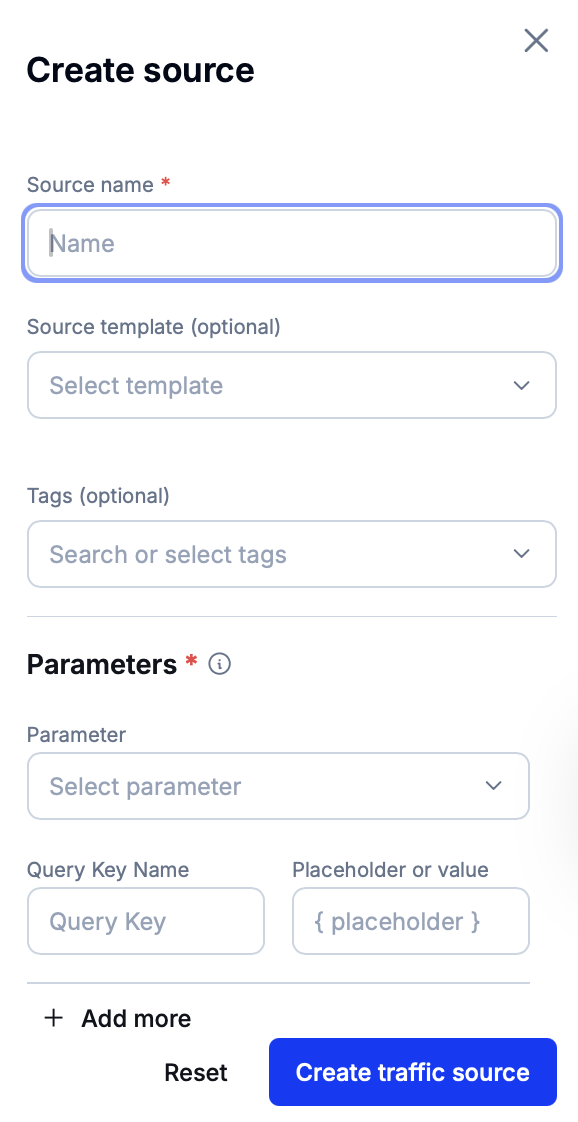
Set the source name, attach tags to it and, optionally, select a source template. If a source template is chosen, all parameters from this resource will be applied to the new traffic source. It will still be possible to adjust these parameters if needed.
Alternatively, choose an existing custom or system-level parameter in the ‘Parameter’ dropdown and configure it. To add more parameters, press ‘Add more’.
Click on ‘Create traffic source’ to finish resource creation.
Tip
Among other purposes, custom URL parameters can be used to perform the following actions.
Editing a traffic source
Click on a source’s name to open its details.
Make the necessary adjustments in the block to the right and then press ‘Save changes’ to apply these modifications.