Linking domains
Assigning a domain to a server or a CloudFlare account is necessary for its deployment and DNS propagation.
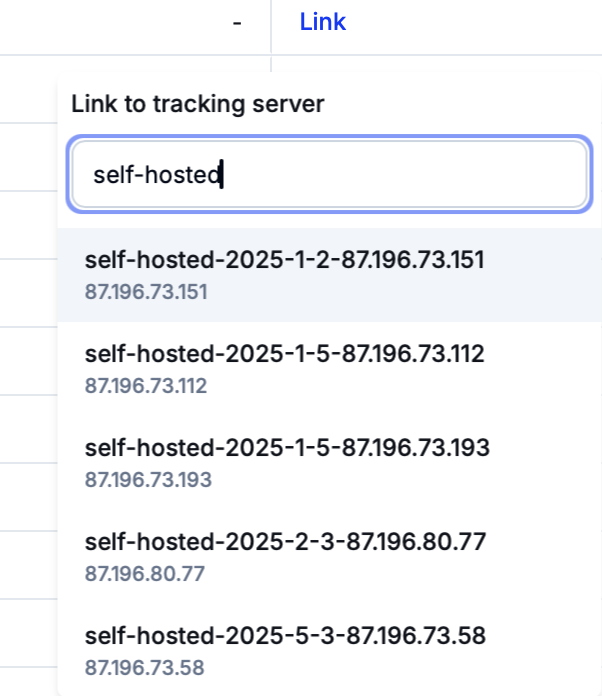
To create this link, click on the ‘Link’/’Assign’ button in the ‘Tracking Server’/’CloudFlare Account’ column of the domains grid and then select the required resource.
Info
If a CloudFlare account is assigned to a domain, said domain will use CloudFlare as the default means of deployment. This occurs even if the domain ais already linked to a server.
::::
After the linkage/assignment process is complete, the domain will automatically point to the chosen server or CloudFlare account. Eversend will also handle other required processes such as managing SSL certificates.
If a domain is already linked to a server or assigned to a CloudFlare account, hover over the server/account in the domains grid and click on ‘Edit’ to change the target of the link/assignment or unlink/unassign the domain entirely.
:::tip[Switching between servers and CloudFlare accounts]
If the domain is linked to a server and is assigned to a CloudFlare account at the same time, it is possible to seamlessly switch between these means of deployment.
To switch from a CloudFlare account to the chosen server, simply unlink the account. Eversend will remove the CloudFlare connection, update A-records and retain the validity of SSL certificates while transferring the domain to the server.
To perform the reverse switch, unlink the server or select a different CloudFlare account. Eversend will update the required nameservers, revise DNS records and set SSL to be running in strict mode.
Info
It is possible to create domains without linking them to servers or CloudFlare accounts. However, such domains will not be hosted anywhere and will not be accessible to their target audiences.
DNS checks
When a domain is linked to a server or a CloudFlare account, Eversend will automatically start DNS checks for A and NS records. The check schedule is as follows.
Every five minutes for the first two hours
Every 15 minutes for the next 22 hours
Every hour on the second day
Checks continue until all geo regions are propagated.